

AI Agents are opening up new ways to interact with mechanical design software. Instead of manually executing individual commands or writing code for every task, engineers can use natural language to describe their requirements, allowing AI to analyze them and orchestrate the corresponding engineering functions.
By combining Claude AI, NX Open, and MCP (Model Context Protocol), users can build systems that support automated 3D model creation, part modification, Assembly management, drawing generation, and data processing in Siemens NX. This also represents a new approach to developing CAD automation applications tailored to specific business needs.
1. AI Agent in NX Design Automation
Siemens NX provides the NX Open API suite, which supports the automation of design, assembly, drafting, and machining tasks. Engineers can use Python, C#, VB.NET, or C/C++ to develop NX Open programs.
When integrated with Claude AI and MCP, users can convert natural-language requests into engineering operations in NX.
Examples of such requests include:
- Creating 3D parts based on specified dimensions.
- Adding holes, Fillets, Chamfers, and other Features.
- Reading Assembly structures and exporting BOMs.
- Generating 2D drawings from 3D models.
- Checking dimensions and geometric properties.
- Developing design applications based on enterprise standards.
Claude analyzes the request, selects the appropriate MCP Tool, and passes the parameters to the corresponding NX Open functions. After each execution, the system returns the results, allowing the AI to determine the next step.
2. Role of Claude AI, NX Open and MCP
2.1. Claude AI – Analysis and Orchestration
Claude acts as the AI Agent, converting natural-language requests into sequences of engineering operations.
For example, given a request to create a cylinder with a diameter of 50 mm and a length of 100 mm, add a concentric through-hole with a diameter of 12 mm, and chamfer both ends, Claude will:
- Analyze the geometric parameters.
- Determine the Feature creation sequence.
- Select the corresponding MCP Tools.
- Pass parameters to NX Open.
- Receive the execution results and process the next step.
Claude can be used through Claude Desktop, Claude Code, or its API.
2.2. Siemens NX Open – Execution API
NX Open provides APIs for accessing and controlling Siemens NX functionality. Supported programming languages include Python, C#, VB.NET, C/C++, and Java.
| Functionality | Automation capabilities |
| Part Modeling | Create Sketches, Extrudes, Revolves, Holes, Fillets, and Chamfers |
| Assembly | Create, modify, and manage Assembly structures |
| Drafting | Create drawings, views, dimensions, and annotations |
| Measurement | Measure dimensions, volume, area, and mass |
| Data Management | Open, save, manage, and export data |
| CAM | Automate certain machining programming workflows through relevant APIs |
| Custom Application | Develop dedicated interfaces and applications |
One key advantage of NX Open is that it can be deployed as a standalone application or integrated into the NX environment. In an AI Agent system, it serves as the layer that directly executes engineering operations.
2.3. MCP – Connecting AI with NX Open
MCP (Model Context Protocol) is an open protocol initiated by Anthropic that standardizes how AI connects to external tools and data sources.
The MCP Server exposes tools that Claude can call as needed. Examples include:
create_sketch: Create a Sketch.create_extrude: Create an Extrude feature.create_hole: Create a hole.create_fillet: Create a Fillet.get_part_info: Retrieve part information.get_body_properties: Retrieve geometric properties.export_step: Export STEP data.create_drawing: Create a drawing.
Note: These are illustrative tools developed by application developers, not a default set of MCP functions provided by Siemens.
3. Claude – MCP – NX Open Integration Architecture
A reference implementation architecture can be structured as follows:
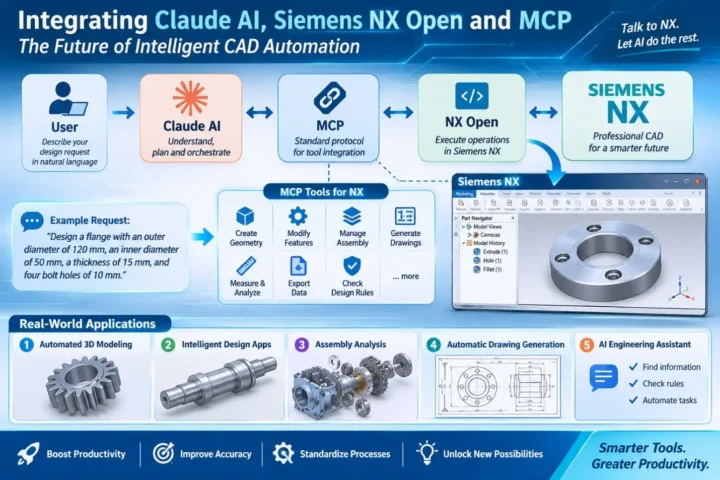
User → Claude AI → MCP Client → MCP Server → NX Open Bridge → Siemens NX
The workflow is as follows:
- The user enters a design request.
- Claude analyzes the request and selects an MCP Tool.
- The MCP Client sends the request to the MCP Server.
- The MCP Server validates the parameters and forwards the command to the NX Open Bridge.
- NX Open executes the operation in Siemens NX.
- The results are returned to the MCP Server and Claude.
- Claude evaluates the results and calls the next tool if necessary.
The NX Open Bridge is an intermediary component that must be developed to connect the MCP Server with the NX Open execution environment. Some community projects have adopted this approach by combining an MCP Server with a Bridge running inside NX.
4. 5 AI Agent Applications in Siemens NX
4.1. Creating 3D Models Using Natural Language
Users describe the required geometry and parameters, and Claude converts the request into NX Open commands.
Example: Create a flange with an outer diameter of 120 mm, an inner diameter of 50 mm, and a thickness of 15 mm, featuring four 10 mm diameter holes evenly distributed along a 90 mm pitch circle diameter.
The workflow includes:
- Create a Sketch of the flange profile.
- Use Extrude to create the 3D solid.
- Define the pitch circle and hole positions.
- Create four bolt holes.
- Validate the geometry and save the Part.
4.2. Designing Parts Based on Enterprise Standards
For parts with repetitive structures, businesses can develop NX Open applications that generate models from a predefined set of input parameters.
Example: Designing a drive shaft
Users enter the diameters of individual shaft sections, section lengths, keyway positions, thread dimensions, and other technical requirements. Claude converts this information into parameters for NX Open to generate the model.
Note: Internal design rules can also be integrated to validate parameters before geometry is created.
4.3. Automating Assembly Design
AI can use NX Open tools to:
- Read Assembly structures and Component information.
- Retrieve assembly relationships and constraints.
- Add components and define constraints.
- Check geometric conditions and clearances.
For example, a user may request an inspection of Components that are not fully constrained or locations where interference may occur. Claude then calls the programmed data-retrieval and geometric inspection tools to perform the checks.
4.4. Automating Technical Drawing Generation
NX Open can be used to automate tasks such as:
- Creating Drawing Sheets based on specified paper sizes.
- Generating orthographic and isometric views.
- Adding dimensions, symbols, and annotations.
- Exporting drawings to PDF or other supported formats.
Businesses can integrate title blocks, drafting standards, and drawing-naming conventions into these workflows.
4.5. Building an AI Assistant for Engineers
Claude can be combined with data and NX Open tools to develop dedicated AI assistants for engineers, supporting functions such as:
- Retrieving Part information and Feature Trees.
- Analyzing geometric properties.
- Checking design rules.
- Supporting troubleshooting and error resolution.
- Executing repetitive tasks.
Data sources may include NX Open documentation, design standards, part libraries, and internal engineering procedures.
5. Example: Creating a Part in NX Using a Natural-Language Request
Assume that the MCP Server has integrated tools for creating Sketches, Extrudes, and Holes, inspecting geometry, and saving Parts. The user enters the following request:
“Create a rectangular block 100 x 60 x 20 mm, add four holes of diameter 8 mm at each corner, and save the part as Base_Plate.prt.”
Claude analyzes the request and calls the tools in the following sequence:
| Step | MCP Tool | Result |
| 1 | create_sketch | Create a 100 x 60 mm Sketch |
| 2 | create_extrude | Create a 3D solid with a thickness of 20 mm |
| 3 | create_hole | Create four holes with a diameter of 8 mm |
| 4 | inspect_body | Inspect the geometry |
| 5 | save_part | Save the NX file |
After each operation, Claude receives the execution results and determines the next step. If an error occurs, the AI can handle it based on the returned information and the programmed error-handling mechanisms.
Note: To define the exact positions of the four holes, the distances from the hole centers to the edges or an equivalent positioning rule must also be specified.
6. 3 Levels of AI Automation Implementation in NX
| Level | Approach | Application |
| 1 – AI-assisted programming | Claude generates Python/C# code for NX Open | Developing Journals, automating tasks, and building applications |
| 2 – AI control through MCP | Claude directly calls MCP Tools integrated with NX Open | Creating models, modifying parts, retrieving data, and generating drawings |
| 3 – Integrated AI Agent | Connecting multiple MCP Servers and data sources | Coordinating NX, product lifecycle management systems, CAM, and technical reporting |
7. Technical Requirements for Implementation
To ensure system stability and accuracy, the following factors need to be controlled:
- NX Open API: Verify function validity, parameter requirements, and version compatibility.
- Session State: Manage objects, model states, and execution sequences within NX.
- Geometry Validation: Check dimensions, Features, constraints, and design conditions after execution.
- Security: Define permissions for operations involving deletion, overwriting, data export, and model modification.
- System Compatibility: Verify compatibility between NX versions, NX Open, Python/.NET environments, and the MCP Server.
In particular, successful command execution does not necessarily mean that the resulting model meets the engineering requirements. The system needs an independent validation step to verify the results.
8. Conclusion
Combining Claude AI, Siemens NX Open, and MCP enables natural-language design requests to be translated into CAD operations executed in Siemens NX. This provides a foundation for developing AI-driven CAD automation, helping businesses expand their automation capabilities and leverage Siemens NX programming functions.
Learn more
- Can AI Run a Factory Autonomously? A New Milestone from Siemens and NVIDIA
- Introducing NX X – A Cloud-Based CAD Solution
- Designcenter: Expanding Design Capabilities with AI and Digital Twin
Meet the VBTECH team at SEMIEXPO Vietnam 2026 to discuss Siemens EDA solutions and learn more about emerging developments in semiconductor design technology.
📅 Date: December 3–4, 2026
📍 Venue: Thiskyhall Sala Convention Center, Ho Chi Minh City
👉 Register here
About us
VBTECH – Siemens’ official distribution partner in Vietnam – provides software solutions and digital engineering services, including consulting, implementation, and after-sales technical support.