


From design data to finished boards – Siemens introduces an industry-standard CAM toolset that helps PCB fabricators verify, optimize, and generate manufacturing output within a single platform.
In printed circuit board (PCB) fabrication, even a small error overlooked during pre-production can lead to costly scrap, delivery delays, and unplanned rework. As PCB designs become more densely populated and multilayered, with increasingly demanding mechanical tolerances, relying solely on 2D drawings or manual checks is no longer enough to ensure a production run goes right the first time.
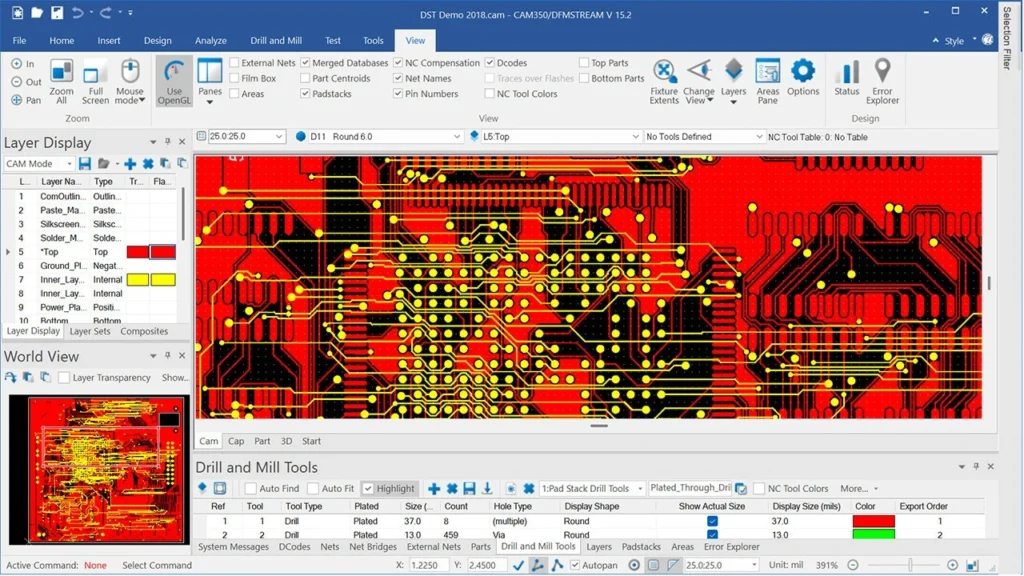
To address this challenge, Siemens offers Valor CAM350 – an integrated manufacturing data preparation solution designed for PCB fabricators that need to control quality from the earliest stages of production. Instead of using separate applications for each task, Valor CAM350 brings data import, editing, analysis, fabrication panel design, stencil design, and manufacturing output generation into one platform.
One of Valor CAM350’s distinguishing capabilities is 3D visualization of CAM data exported from widely used PCB design tools. Manufacturing engineers can rotate and zoom in on a board, and explore its internal layers to examine its structure in detail. This helps reveal potential conflicts or defects that may be difficult to spot in conventional 2D views – before a physical PCB is fabricated.
Why do PCB fabricators need Valor CAM350?
Modern PCB designs are increasingly complex and require thorough verification before moving into volume production. Identifying design and Design for Manufacturing (DFM) issues during pre-production helps fabricators avoid costly problems later, rather than resolving them after production has begun.
With Valor CAM350, design data can be inspected, prepared, and validated within a single platform: import the design data, make necessary edits, analyze it for potential fabrication issues, and generate the final manufacturing output for the factory. Standardizing this workflow can shorten preparation time and reduce the risk of unexpected costs associated with special handling or rework. It also helps fabricators produce PCBs at a lower cost. The result is a smoother transition from engineering data to physical PCBs, with greater speed, accuracy, and cost efficiency.
Key strengths of Valor CAM350
Visualize manufacturing data in 3D
The 3D environment provides a more intuitive way to examine manufacturing data than a conventional 2D view. Users can explore how the finished PCB will look from any angle, including between its layers, to identify potential irregularities before fabrication begins.
Fabrication panel design
Arranging multiple PCBs on a fabrication panel for volume production can be time-consuming when done manually. With Valor CAM350’s automated panel design wizard, users enter a few basic parameters, and the software creates a multi-PCB layout designed to minimize material waste. This helps reduce material costs and preparation time.
Flexible solder paste stencil design
Valor CAM350 enables users to create custom solder paste stencils from Gerber data, PCB footprints, or an existing stencil library, including custom paste mask shapes. Stencil configurations can be stored in a user-defined library and reused across PCB designs, helping standardize the process across projects.
Key capabilities of Valor CAM350
Valor CAM350 brings together the manufacturing data workflow – from import, review, editing, and analysis to output generation – in one platform, reducing the interruptions caused by switching between multiple applications:
- Data import and export. Valor CAM350 works with virtually all PCB design tools through industry-standard file formats, including ODB++, IPC-2581, Gerber, Excellon, Sieb & Meyer, DXF, GenCAD, and HPGL. Processed data can be exported to ODB++, IPC-2581, Gerber, DXF, Excellon, Sieb & Meyer, or HPGL, with additional export options including PADS ASCII and GenCAD. This supports flexible data exchange throughout the design-to-manufacturing supply chain.
- Viewing, querying, measuring, and reporting. Engineers can inspect individual layers of PCB fabrication data, take precise measurements, and generate reports for quality control. These capabilities also support technical communication between design and manufacturing teams.
- CAM data editing. When discrepancies are found or minor adjustments are needed, users can edit CAM data directly in Valor CAM350 without returning to the original PCB design tool, helping them address issues promptly and keep production on schedule.
- Custom scripting with an API. Valor CAM350’s application programming interface (API) allows fabricators to create scripts that automate repetitive processes and tailor data checks and processing steps to their manufacturing workflows.
- Design analysis. Analysis capabilities help engineers review PCB data and identify potential DFM issues early, reducing the risk of defects when the board enters fabrication.
- Reverse engineering. When design information must be reconstructed from non-intelligent data such as Gerber, Valor CAM350 can convert elements into traces, vias, padstacks, footprints, and nets for further analysis, editing, or fabrication of a subsequent revision.
An integrated solution for a streamlined workflow
From importing and editing design data to DFM analysis, fabrication panel design, stencil design, and manufacturing output generation, Valor CAM350 helps PCB fabricators shorten preparation time, reduce the risk of production errors, and improve operational efficiency. This is a valuable advantage in an electronics industry where speed and accuracy matter at every stage.
According to the Siemens product page, the currently listed release is Valor CAM350 15.2, with download information available through the Siemens Support Center.
Learn more:
- Buy CAM350 from an official Siemens distributor in Vietnam
- DownStream solutions for PCB DFM checks and manufacturing data preparation
- Applying DFM to flexible PCB designs
Contact VBTECH for a consultation: