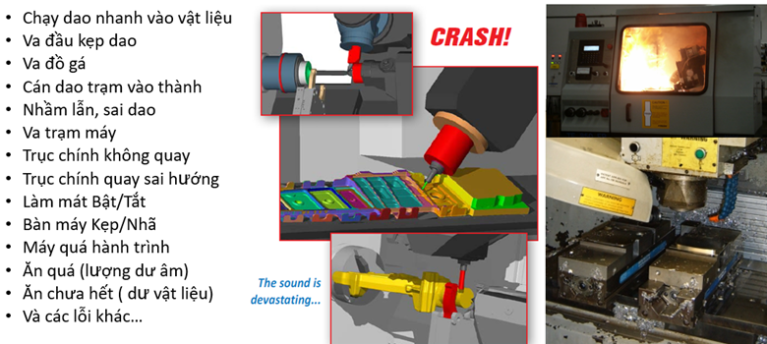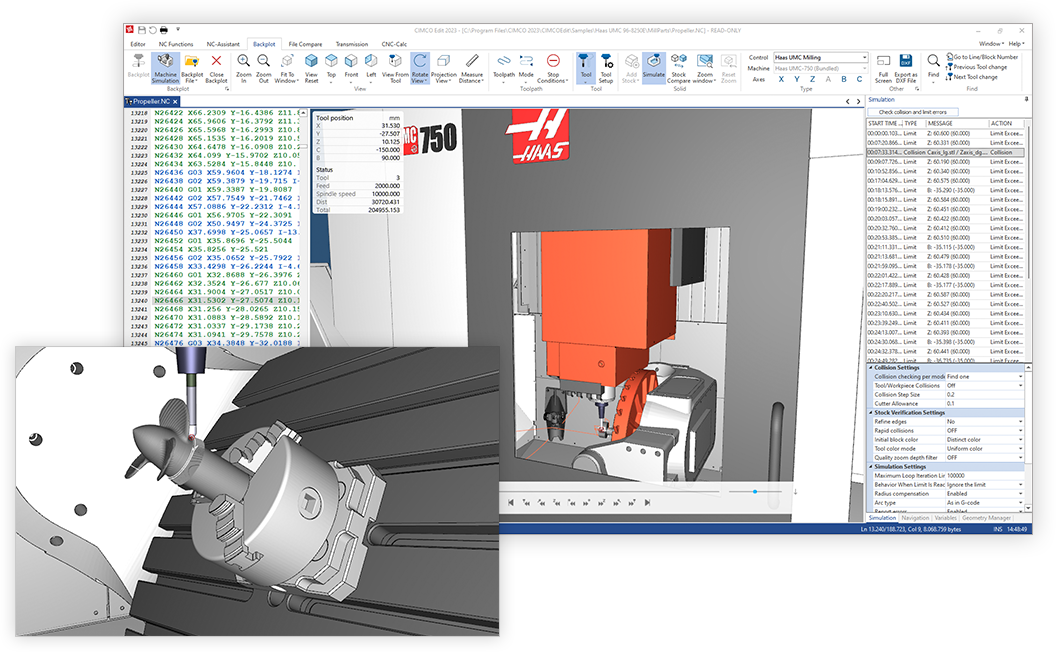


In CNC machining, editing, analyzing, and verifying NC programs before running them on a machine are essential to improving programming efficiency, reducing errors, and minimizing machining risks.
CIMCO Edit is a specialized software solution that enables CNC programmers to edit NC code, compare programs, visualize toolpaths, and simulate machining operations on a computer. It helps users verify programs before transferring them to CNC machines, reducing the need for manual checks directly on the machine.
On September 1, 2026, CIMCO introduced two new product editions, CIMCO Edit Core and CIMCO Edit Ultra, replacing the previous CIMCO Edit Standard and CIMCO Edit Professional editions. This product restructuring provides customers with clearer options based on their requirements while expanding NC program simulation and verification capabilities, particularly in the Ultra edition.
1. CIMCO Edit Core – Efficient NC Program Editing and Verification
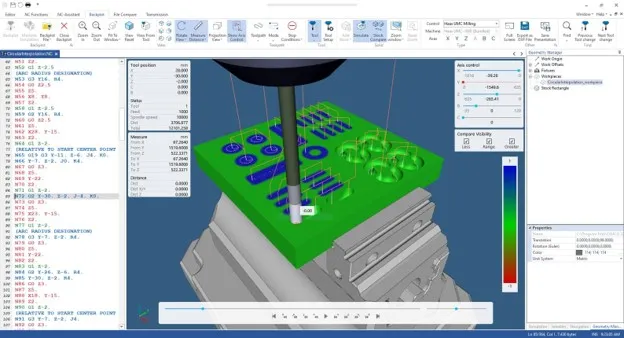
CIMCO Edit Core is the successor to Edit Standard. It is designed for everyday NC program editing, management, and verification in CNC programming workflows. Core combines professional NC code editing tools with full Backplot functionality, enabling programmers to visualize toolpaths directly on their computers.
Key features:
- Professional NC program editing: Supports NC code editing, block numbering, search and replace, and feed rate and spindle speed adjustments.
- Program comparison: File Compare identifies differences between program versions, helping users control changes and prevent errors when updating NC code.
- Backplot and toolpath visualization: Displays tool movements based on NC programs, helping users review machining sequences and identify potential issues before running programs on CNC machines.
- Program analysis: Provides toolpath statistics and analysis tools to help programmers evaluate programs and prepare for machining.
- Support for diverse CNC programming workflows: Suitable for editing, reviewing, and exchanging NC programs between CAM, CNC programming, and manufacturing teams.
CIMCO Edit Core is an ideal choice for companies that need a powerful NC editing tool with toolpath visualization capabilities but do not require the advanced material simulation and collision verification features available in Ultra.
2. CIMCO Edit Ultra – Advanced CNC Simulation and NC Program Verification
CIMCO Edit Ultra is the successor to Edit Professional. It is designed for manufacturers requiring more advanced NC program simulation and verification before production.
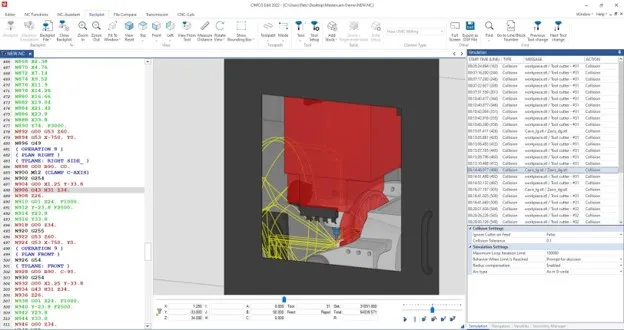
Ultra includes Core’s features and builds on the material simulation capabilities powered by high-performance GPU graphics, together with CAM integration inherited from the Professional edition. In particular, Ultra introduces advanced verification functions that were previously available only through the Machine Simulation Add-on.
Key features
- 3D material removal simulation (Solid Simulation): Visualizes the machining process and the material being removed, allowing users to inspect the expected machining results.
- Collision detection and reporting: Helps identify collisions between cutting tools, stock, and fixtures during simulation.
- Enhanced safety checks: Detects conditions such as rapid moves into stock (rapid-to-stock) and tool holder collisions with stock (holder-to-stock).
- Over-travel limit reporting: Identifies tool movements that exceed configured machine travel limits.
- Advanced stopping conditions: Allows simulation to stop automatically when specified events occur, such as collisions or travel limit violations.
- Additional analysis and verification tools: Supports post-machining stock inspection, cross-sectional views, and detailed tool movement review, depending on the functions included in the edition.
These capabilities make CIMCO Edit Ultra suitable for manufacturers machining complex components, programming multi-axis operations, or requiring more comprehensive NC program verification before releasing programs to CNC machines.
By identifying potential problems during simulation, manufacturers can reduce the need for on-machine program corrections and minimize production risks.
Important note: Ultra provides toolpath verification and collision reporting within Backplot. For full CNC machine simulation using detailed 3D models of the machine structure, spindle, table, and moving components, the CIMCO Machine Simulation Add-on remains available as an additional solution.
3. Transition from Legacy CIMCO Edit to Core and Ultra
Effective September 1, 2026, CIMCO transitioned from the previous Standard and Professional editions to the new Core and Ultra product structure. This change represents both a product portfolio restructuring and an expansion of verification capabilities, rather than a simple renaming of the existing editions.
- CIMCO Edit Standard → Edit Core: Focuses on professional NC editing and comprehensive Backplot functionality.
- CIMCO Edit Professional → Edit Ultra: Extends NC editing and simulation capabilities with 3D material removal simulation, collision detection, and advanced verification tools.
4. Do existing customers need to purchase new licenses?
According to CIMCO’s transition announcement:
- Customers using Edit Standard are automatically eligible for Edit Core.
- Customers using Edit Professional are automatically eligible for Edit Ultra.
- To access the new features, customers should install the latest CIMCO Edit version in accordance with the vendor’s instructions.
Therefore, existing customers do not need to purchase a separate upgrade license under the announced transition policy. However, businesses should confirm their license status, software version, and update entitlements with their CIMCO reseller before deployment.
5. Comparison of CIMCO Edit Core and Ultra
The following table summarizes the main differences between the two editions.
| Feature | CIMCO Edit Core | CIMCO Edit Ultra |
|---|---|---|
| NC program editing | Yes | Yes |
| NC file comparison (File Compare) | Yes | Yes |
| Block numbering, search, and replace | Yes | Yes |
| Spindle speed and feed rate adjustment | Yes | Yes |
| Toolpath statistics | Yes | Yes |
| NC Assistant and Macro | Yes | Yes |
| Multi-channel editing/display | Yes | Yes |
| Backplot and toolpath visualization | Yes | Yes |
| Heidenhain/ISO conversion | Yes | Yes |
| 3D material removal simulation (Solid Simulation) | No | Yes |
| Automatic recognition of tools, offsets, stock, and fixtures from the program | No | Yes |
| Syntax, travel limit, and collision verification reporting | Basic | Advanced |
| Definition of multiple stock models, fixtures, and simulation materials | No | Yes |
| Advanced simulation stopping conditions | No | Yes |
| Post-machining stock comparison (Stock Compare) | No | Yes |
| Cross-section viewing and detailed toolpath inspection | No | Yes |
| Machine Simulation Add-on | No | Available as an additional purchase |
Note: This table highlights the principal differences between Core and Ultra. Features dependent on add-ons, configurations, and license entitlements should be confirmed against the actual license package.
6. Which Edition Should You Choose?
Choose CIMCO Edit Core if:
- Your primary requirement is editing and comparing NC programs.
- You need Backplot to review toolpaths.
- You want to standardize and verify NC programs before transferring them to CNC machines.
- You need a practical solution for routine CNC programming and program verification.
Choose CIMCO Edit Ultra if:
- You require 3D material removal simulation.
- You need to check potential collisions between tools, stock, and fixtures.
- You require warnings for movements exceeding machine travel limits.
- You want to strengthen NC program verification before actual machining.
Read more:
- CIMCO’s Complete Smart CNC Machining Solution – Connect, Control and Optimize Your Entire Shop Floor
- CNC Simulate with 3D model of CNC Machine
- CNC Machine Simulation with CIMCO Machine Simulation Software
7. Conclusion
With Edit Core and Ultra, CIMCO provides two clearly differentiated solutions for CNC programming requirements. Core focuses on NC program editing and toolpath visualization, while Ultra extends these capabilities with material simulation and advanced machining safety verification.
For customers currently using Edit Standard or Professional edition, the transition to the new product structure provides access to the corresponding editions without a separate license repurchase under CIMCO’s announced transition policy.
For new customers, the choice between Core and Ultra should be based on program complexity, pre-machining verification requirements, and the specific needs of the manufacturing workflow.
About VBTECH
VBTECH provides software solutions and digital engineering services in Vietnam, including consulting, implementation, and after-sales technical support for engineering design and simulation solutions. Contact VBTECH for detailed consultation.